Transforming Digital Canvases with Organic Texture
In the rapidly evolving world of digital illustration, one of the most persistent challenges artists face is bridging the gap between the sterile perfection of pixels and the warm, tactile imperfection of traditional media. While software like Procreate offers an incredible array of tools, achieving a specific material look—such as grain, knots, and natural variations in timber—often requires complex layering or time-consuming manual painting. This is where specialized tools become indispensable. The Procreate Light Wood Single Brush emerges as a targeted solution for designers and illustrators who need to infuse their work with authentic wooden aesthetics without sacrificing workflow efficiency.
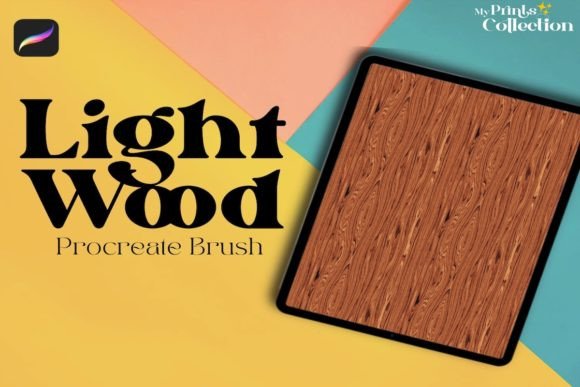
This tool is not merely a stamp; it is a carefully engineered asset designed to replicate the seamless pattern texture of light wood. Whether you are creating packaging mockups, designing interior scenes, or adding subtle background elements to character art, understanding how to leverage this specific brush can significantly elevate the visual depth of your projects.
The Power of Seamless Textures in Digital Art
When we talk about texture in digital art, we are often referring to the surface quality that gives an object its perceived physical presence. A flat color fill, no matter how well-chosen, rarely convinces the eye that an object is made of wood. Wood is complex. It has grain lines that flow, knots that interrupt patterns, and color variations that suggest age and exposure. Manually painting these details for every plank or surface in a composition is not only tedious but often results in repetitive, unnatural-looking patterns.
The Procreate Light Wood Single Brush addresses this by providing a pre-rendered, high-quality texture that mimics the organic randomness of real timber. Because it is designed as a seamless pattern, it allows artists to cover large areas without visible tiling edges. This is crucial for professional-grade work where continuity is key. Instead of spending hours hunting for stock photos or trying to paint grain by hand, you can apply this brush to create an immediate, cohesive wooden surface that reacts naturally to the canvas size.
Streamlining the Creative Workflow
Modern digital workflows demand speed without compromising quality. Illustrators working on tight deadlines for client projects, such as book covers, game assets, or social media graphics, cannot afford to get bogged down in technical texturing processes. Integrating the Procreate Light Wood Single Brush into your library means having instant access to a reliable wood effect.
Consider a scenario where you are illustrating a cozy cabin scene. You need to render a floor, a table, and perhaps some wall paneling. Using standard brushes, you might struggle to keep the grain direction consistent or the lighting uniform across these different elements. With this specialized brush, you can lay down the base texture quickly, then use Procreate’s native blending modes and opacity settings to adjust how the wood interacts with shadows and highlights. This shifts your focus from technical execution to artistic composition, allowing you to spend more time on storytelling and less on repetitive detailing.
Technical Specifications and Compatibility
Before adopting any new digital asset, it is vital to understand its technical requirements to ensure it fits seamlessly into your existing setup. The Procreate Light Wood Single Brush is designed specifically for the iPad ecosystem, leveraging the unique capabilities of Apple’s Pencil and the Procreate interface.
- File Format: The product is delivered as a
.brushsetfile. This is the native format for Procreate brushes, ensuring easy installation and optimal performance within the app. - Software Requirement: To utilize this brush effectively, you must have Procreate App version 5 or higher. Older versions may not support the specific engine parameters used to create the seamless texture effect.
- Platform Limitations: It is important to note that this brush is not compatible with Photoshop or Illustrator. It is exclusively crafted for the Procreate environment. If your workflow involves moving between Adobe products and Procreate, you will need to rasterize your layers after applying the texture in Procreate before exporting them for further editing in other software.
- Delivery Method: This is a purely Digital Product. No physical item will be shipped. Upon completing your purchase order, you will receive a download link for a zip file sized at approximately 1 MB. This small footprint ensures quick downloads and minimal storage usage on your device, while still containing all necessary content.
Installation and Initial Setup
Getting started with the Procreate Light Wood Single Brush is straightforward, but following the correct steps ensures the brush behaves as intended. Once you have downloaded the 1 MB zip file, extract the contents to locate the .brushset file. On your iPad, tap the file and select "Open in Procreate." The app will automatically import the brush into your current brush library, typically placing it in the "Imported" group.
For best results, create a new layer specifically for your wood texture. This non-destructive approach allows you to experiment with different blending modes—such as Multiply, Overlay, or Soft Light—to integrate the wood grain with underlying colors. You can also adjust the opacity to make the wood appear weathered or fresh, depending on the mood of your artwork.
Practical Applications Across Industries
The versatility of light wood textures extends far beyond simple landscape paintings. Various creative industries can benefit from the specific aesthetic provided by the Procreate Light Wood Single Brush.
- Product Design and Mockups: Designers creating packaging concepts for eco-friendly products often use wood textures to convey sustainability and natural ingredients. This brush allows for rapid prototyping of box designs, labels, and tags that feature realistic wooden backgrounds.
- Interior Design Visualization: While professional rendering software exists, many interior designers use Procreate for quick conceptual sketches. Adding realistic flooring or furniture textures helps clients visualize the warmth and tone of a space before committing to materials.
- Game Asset Creation: Indie game developers frequently rely on Procreate for creating 2D assets. Wooden crates, floors, doors, and weapons are staples in many game genres. Using a seamless brush ensures that these assets can be tiled extensively in game engines without visible repetition artifacts.
- Social Media Content: Influencers and content creators often design quote cards or promotional graphics. A light wood background provides a neutral, aesthetically pleasing canvas that makes text pop while maintaining a trendy, rustic vibe.
Achieving Realism Through Layering
While the Procreate Light Wood Single Brush provides an excellent base, true realism often comes from how you build upon it. Do not treat the brush as a final step. Instead, view it as a foundation. After applying the wood texture, consider adding a subtle noise layer to break up any digital smoothness. Use a soft eraser to wear down edges where the wood might naturally age or chip. Add highlights along the grain direction to simulate light reflecting off the varnish or raw surface.
Furthermore, color grading plays a significant role. Light wood can range from pale birch to warm oak. Use Procreate’s Hue, Saturation, and Brightness adjustments to tweak the base color of the brush stroke to match your specific project palette. This flexibility ensures that the Procreate Light Wood Single Brush remains a versatile tool rather than a one-trick pony.
Making the Right Choice for Your Toolkit
When evaluating whether to add this brush to your collection, consider your current project needs. If you frequently find yourself searching for "wood texture" overlays or struggling to paint convincing grain, this tool offers a direct, efficient alternative. It is particularly valuable for artists who prefer working directly on the iPad, valuing portability and touch-based interaction.
However, remember the limitations. Since it is not compatible with desktop-based vector or raster programs like Illustrator or Photoshop, it is best suited for workflows that are centered around Procreate. If your final output requires scalable vectors, this raster-based brush will not meet those needs. But for pixel-based digital painting, illustration, and design, it serves as a powerful enhancer of visual fidelity.
In conclusion, the Procreate Light Wood Single Brush is more than just a digital stamp; it is a workflow accelerator that brings the warmth and complexity of natural materials into the digital realm. By understanding its technical requirements, leveraging its seamless nature, and combining it with thoughtful layering techniques, artists can create richer, more engaging visuals that resonate with viewers on a tactile level.