Create Stunning Wedding Art with Procreate Stamps
Digital illustration has transformed how artists approach event design, invitation creation, and decorative art. For many creators, starting from a blank canvas can be intimidating or time-consuming. This is where specialized tools like the Wedding Procreate Brush Stamp Color Ipad collection become invaluable. These digital assets are not just simple clipart; they are dynamic, hand-drawn elements designed to integrate seamlessly into your workflow on an iPad. By combining artistic charm with technical flexibility, these brushes allow you to craft professional-quality visuals without needing years of traditional drawing experience.
Understanding the Value of Hand-Drawn Digital Stamps
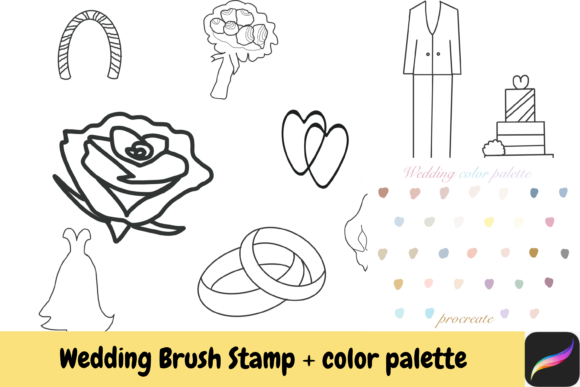
The core appeal of this toolset lies in its balance between convenience and creativity. When we talk about Wedding Procreate Hand drawn Brush Stamps with color palette, we are referring to pre-made shapes that retain the organic feel of pencil or ink sketches. Unlike rigid vector graphics, these stamps have texture and warmth. They include essential motifs such as dresses, suits, flowers, hearts, doves, rings, wedding arches, roses, wine glasses, and cakes.
For beginners, this removes the pressure of perfecting complex anatomy or perspective. You do not need to spend hours sketching a realistic rose or a detailed tuxedo. Instead, you can focus on composition, layout, and color theory. The ability to instantly place a beautifully rendered wedding arch or a delicate dove allows you to experiment with different arrangements rapidly. This speed is crucial for freelancers and small business owners who often work under tight deadlines.
Key Features and Creative Flexibility
One of the most significant advantages of using these brushes is their adaptability. While the initial download provides a set of default colors, the true power comes from your ability to customize them. Since these are raster-based stamps within Procreate, you can easily change the color by using your preferred color palette. This means a single rose stamp can be adapted for a spring pastel theme, a bold red romantic design, or a monochrome minimalist look.
- Versatile Elements: The collection covers a wide range of wedding-related items, ensuring you have the necessary components for various designs.
- Color Customization: Use Procreate’s hue, saturation, and brightness adjustments to match any brand identity or event theme.
- Layering Capability: Combine multiple stamps, such as placing a heart over a ring or surrounding a cake with flowers, to create unique composite images.
- High Resolution: Designed for clarity on Retina displays, ensuring your final exports look crisp for both digital sharing and printing.
This flexibility supports a wide array of creative goals. Whether you are designing a save-the-date card, a social media post for a wedding planner, or a decorative element for a blog header, these tools provide the foundational assets you need. The hand-drawn aesthetic adds a personal touch that stock photography often lacks, making your work feel more authentic and engaging.
Practical Applications for Creators and Entrepreneurs
The utility of the Wedding Procreate Brush Stamp Color Ipad extends beyond simple hobbyist projects. For entrepreneurs and small business owners, these assets can streamline production processes. Consider a freelance graphic designer who specializes in wedding stationery. Using these stamps, they can create mock-ups for clients quickly, allowing for faster feedback loops and revisions. Similarly, educators teaching digital art can use these brushes to help students understand composition without getting bogged down in technical drawing skills.
Bloggers and marketers can also benefit significantly. Visual content is king in digital marketing, and having a library of cohesive, themed graphics helps maintain brand consistency. You can create eye-catching pins for Pinterest, Instagram stories, or Facebook covers featuring elegant wine glasses, intricate rings, or floral arches. Because the style is consistent across all elements, your visual identity remains strong and recognizable.
Even for casual users planning their own weddings, these tools offer a fun way to visualize ideas. You can create mood boards, design custom invitations, or make personalized thank-you cards. The process becomes part of the celebration, allowing you to infuse your personality into every detail.
Getting Started: Installation and Best Practices
To begin using these tools, you will need an iPad with the Procreate app installed. The product is delivered as an instant download, which typically comes in a compressed ZIP file. Before you can access the brushes, you must unzip the file. On an iPad, this can usually be done through the Files app. Once unzipped, you will find the brush set file, which you can import directly into Procreate by tapping on it and selecting "Open in Procreate."
Here are some practical tips for maximizing your results:
- Organize Your Layers: Keep each stamp on a separate layer. This makes it easier to move, resize, or recolor individual elements without affecting the rest of your design.
- Experiment with Blending Modes: Try changing the blending mode of your stamp layers to "Multiply" or "Overlay" to see how they interact with background textures or colors.
- Use Reference Palettes: If you are unsure about color combinations, look for wedding color trends online and create a custom palette in Procreate to match. This ensures your flowers, suits, and decor elements harmonize perfectly.
- Combine with Textures: Add paper textures or watercolor backgrounds to enhance the hand-drawn feel of the stamps.
Important Considerations for Commercial Use
Before incorporating these assets into client work or products for sale, it is essential to understand the licensing terms. This specific collection allows for small commercial use, which is ideal for independent creators, freelancers, and small businesses. However, "small commercial use" generally implies that you are using the stamps as part of a larger design, such as in an invitation suite, a logo, or a printed product, rather than reselling the brush files themselves.
Always read the specific license agreement included with your download. Some restrictions may apply regarding the volume of sales or the type of products created. By adhering to these guidelines, you protect your business and respect the intellectual property of the original artist. Additionally, remember that these brushes are designed specifically for Procreate on iPad. They will not function in other software like Photoshop or Illustrator unless converted, which may alter their quality and functionality.
In conclusion, the Wedding Procreate Brush Stamp Color Ipad collection is a powerful resource for anyone looking to elevate their digital art with minimal effort. By providing high-quality, customizable, and thematic elements, it bridges the gap between amateur enthusiasm and professional output. Whether you are crafting heartfelt invitations, building a brand presence, or simply exploring your creative imagination, these hand-drawn stamps offer the perfect foundation for your next project.