40 Leaves Badge Procreate Stamps: A Practical Guide for Digital Designers
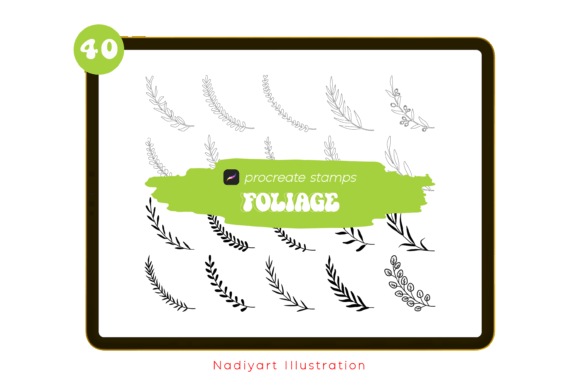
If you have ever spent hours trying to hand-draw the perfect fern frond or a symmetrical tropical leaf, only to delete it because the proportions felt off, you understand the value of a good shortcut. The 40 Leaves Badge Procreate Stamps are not just another pack of digital brushes; they are a time-saving toolkit designed specifically for artists who want to add organic, hand-drawn flair to their work without starting from scratch every single time. These stamps are crafted for Procreate 5.0 or higher, ensuring smooth integration with the latest features on your iPad.
Unlike generic clip art that can look stiff or overly commercial, this collection focuses on a rustic, natural aesthetic. Whether you are designing a wedding invitation, creating a pattern for fabric, or adding a decorative border to a social media post, these foliage elements provide the greenery and texture needed to elevate your composition. It is important to note right away that these are .brushset files compatible only with Procreate. They will not work in Photoshop or other desktop software, so ensure your workflow is centered around the iPad ecosystem before downloading.
Why Hand-Drawn Foliage Matters in Digital Design
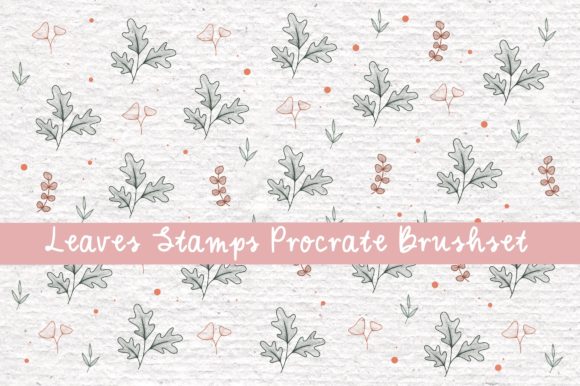
In an era where AI-generated images and stock photos are everywhere, there is a growing demand for assets that feel human and authentic. The 40 FOLIAGE PROCREATE STAMPS offer that tactile, hand-drawn quality that resonates with audiences. When you use these stamps, you are not just placing an image; you are adding a layer of artistic intent. The slight imperfections in the lines and the organic shapes give your designs warmth and character.
For marketers and small business owners, this distinction is crucial. A brand that uses unique, custom-looking graphics stands out more than one relying on free, overused vector libraries. These leaves, ranging from tropical monstera styles to delicate rustic sprigs, allow you to maintain a consistent visual identity across different platforms. You can use them to frame product photos, create background patterns for packaging, or add subtle details to email newsletters.
Real-World Applications for Creators and Entrepreneurs
The versatility of this brush set means it fits into various professional and personal projects. Here is how different users can leverage these tools effectively:
- Wedding and Event Stationery: If you are a freelance designer creating invitations, these badges are perfect for framing text. Use the larger leaves to create corners for save-the-date cards or scatter smaller sprigs around the RSVP details. The rustic nature of the stamps complements bohemian, garden, and outdoor wedding themes beautifully.
- Pattern Design for Print-on-Demand: Sellers on platforms like Etsy or Redbubble can use these stamps to create seamless patterns for tote bags, phone cases, and notebooks. By rotating and layering the 40 different leaf shapes, you can generate complex, lush backgrounds that look professionally illustrated.
- Social Media Content Creation: Bloggers and influencers often need quick graphics for Instagram stories or Pinterest pins. Instead of searching for transparent PNGs online, you can stamp these leaves directly onto your photos within Procreate. Add a tropical leaf behind a quote or use a border of greenery to highlight a new product launch.
- Educational Materials: Teachers and educational publishers can use these elements to make worksheets and presentations more engaging. A biology lesson on plant structures becomes more visually appealing with accurate, stylized leaf illustrations. They can also be used to decorate classroom posters or reward charts.
Understanding the Technical Requirements
Before you dive in, it is essential to understand the technical side. These stamps are optimized for Procreate 5.0 or higher. This requirement ensures that the brushes take advantage of recent updates to the app’s engine, providing better responsiveness and stability. If you are using an older version of Procreate, you may experience lag or compatibility issues, so updating your app is a necessary first step.
Another critical point is the file format. The package contains a .brushset file. This is a proprietary format for Procreate. You cannot import these directly into Adobe Photoshop, Affinity Designer, or Clip Studio Paint. However, if you do need to use these designs in other software, there is a workaround. You can create a new canvas in Procreate, stamp the leaves you need, and export the canvas as a high-resolution PNG with a transparent background. This allows you to use the assets elsewhere, though you lose the ability to edit them as live brushes.
Tips for Getting the Most Out of Your Stamps
To truly benefit from the 40 Leaves Badge Procreate Stamps, you should experiment with the settings. Do not just stamp and leave. Adjust the opacity to create depth, making some leaves appear in the background and others in the foreground. Change the color hue to match your brand palette; since these are digital stamps, you can easily recolor them to fit autumnal oranges, deep forest greens, or pastel spring tones.
Layering is key. A single leaf might look simple, but overlapping three or four different stamps can create a lush, dense cluster that looks like a detailed illustration. Try rotating the stamps to break up repetition. Nature is rarely symmetrical, so varying the angle and size of each leaf will make your design feel more organic and less manufactured.
Who Should Consider This Toolkit?
This resource is ideal for anyone who values efficiency without sacrificing quality. If you are a hobbyist looking to enhance your digital journaling, these stamps add a touch of elegance to your daily logs. For professional graphic designers, they serve as a reliable base that can be customized further, saving billable hours on repetitive drawing tasks. Even if you are not a skilled illustrator, these stamps allow you to produce work that looks hand-crafted and professional.
However, if you are looking for photorealistic botanical illustrations, this may not be the right fit. These stamps are stylized and hand-drawn, focusing on charm and character rather than scientific accuracy. They are best suited for decorative purposes, branding, and creative projects where a personal touch is desired.
Making the Right Choice for Your Workflow
When deciding whether to download this set, consider your current project needs. Do you frequently create designs that require floral or natural elements? Do you work primarily on an iPad? If the answer is yes, this tool will likely become a staple in your library. The convenience of having 40 pre-designed, high-quality leaves at your fingertips cannot be overstated. It removes the friction of creation, allowing you to focus on layout, typography, and overall composition.
Remember, the goal of using tools like the 40 FOLIAGE PROCREATE STAMPS is not to replace your creativity but to support it. By handling the tedious task of drawing individual leaves, these stamps free up your mental energy for bigger creative decisions. Whether you are decorating a poster, designing a pattern, or simply adding a bit of greenery to a digital badge, this collection offers a practical, stylish solution for modern digital creators.